
Create your organization
Choose a name and registration page address. Add your team, locations, and reusable course templates.
Publish your classes, share a signup link, collect payments, and download your roster. Students can register without creating an account.
Start free with no card required and no expiration. Built from managing classes at Last Minute Training, and available for instructors, schools, and training organizations.
Registering for a class? Use the registration link provided by your organization.
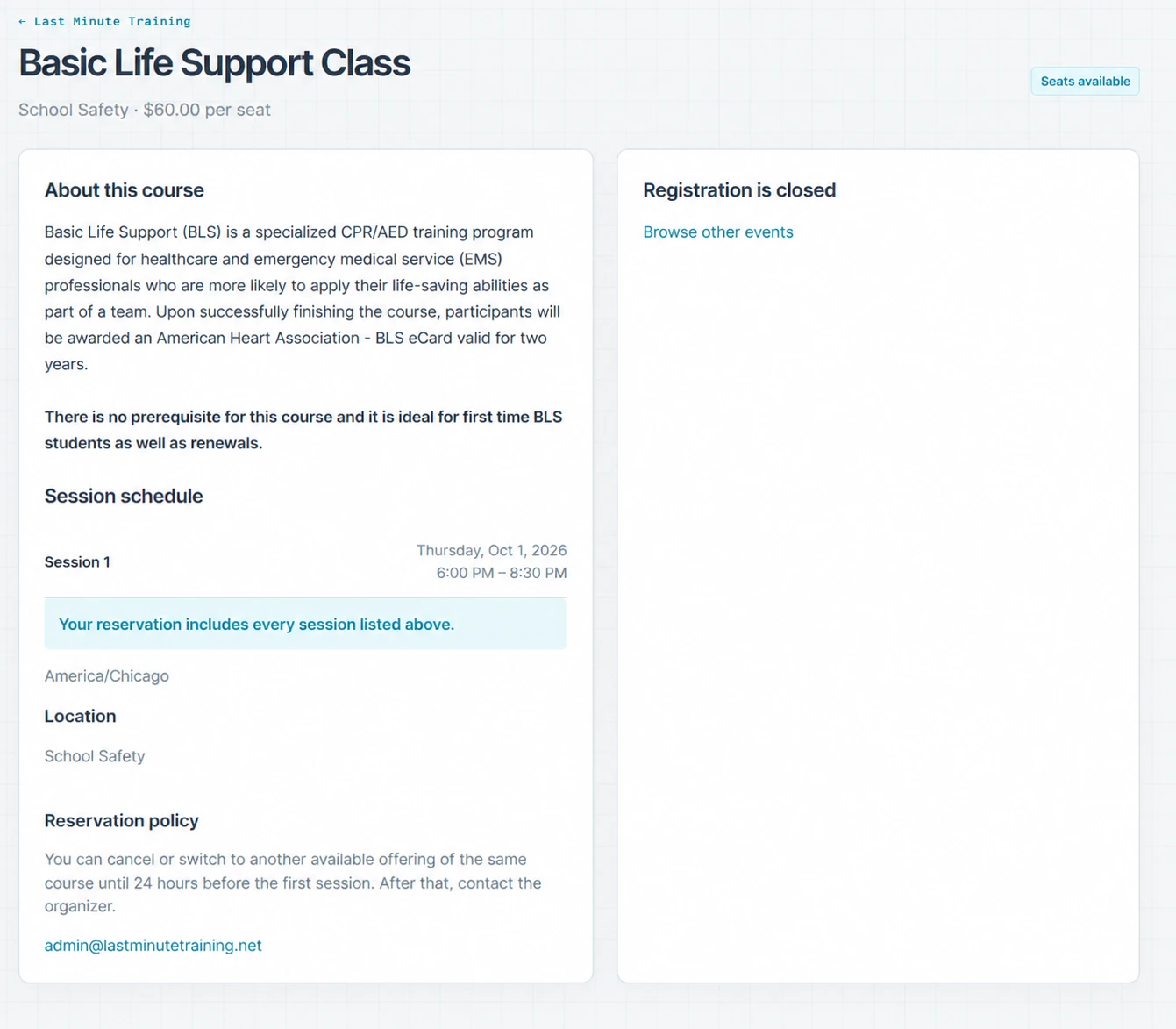
Built from managing our own classes. RosterDock grew out of managing CPR and safety training at Last Minute Training in Bismarck, North Dakota. We built it to keep registrations, payments, attendance, and rosters together, then opened it up for other instructors and training organizations.
Created by Steven Featherston, owner of Last Minute Training. Questions and feedback go to [email protected].
Create your organization, publish a class, and share the link with your students.
Choose a name and registration page address. Add your team, locations, and reusable course templates.
Send students directly to your organization’s page to choose a class and reserve their seats.
Manage bookings, update attendees, record attendance, and export rosters from your workspace.
Explore the parts of RosterDock that match the way your organization runs classes.
Publish classes, share registration links, manage seats, and keep class details organized.
Build rosters from registrations, record attendance, and export PDF or CSV reports.
Give students a simple signup process without requiring a student account.
Manage recurring CPR, first aid, BLS, safety, and skills training workflows.
Organize recurring education, instructors, attendance, communication, and records.
Spend less time moving names between spreadsheets and chasing class details. Keep registration, communication, and attendance together.
Print a PDF with all registered students and signature space. Export a CSV of students marked present, including answers to your registration questions. Schedule roster emails for administrators and assigned instructors.
Students reserve seats through your organization’s registration page without creating a password. Accept individual or group bookings, collect custom answers, and let groups add attendee names later.
Configure class reminders and customize email templates. Send students the dates, directions, and preparation details they need, with organizer control over cancellation notifications.
Build reusable course templates, manage multiple locations, and view events in a calendar or list. Set seat limits and choose public listings or events available only through a shared link.
Review reservations, update student details, and record attendance per attendee and session. Keep payment status alongside your roster so your team can prepare for class.
Manage several organizations from one account. Invite administrators and instructors, assign instructors to events, and keep each organization’s registrations and records separate.
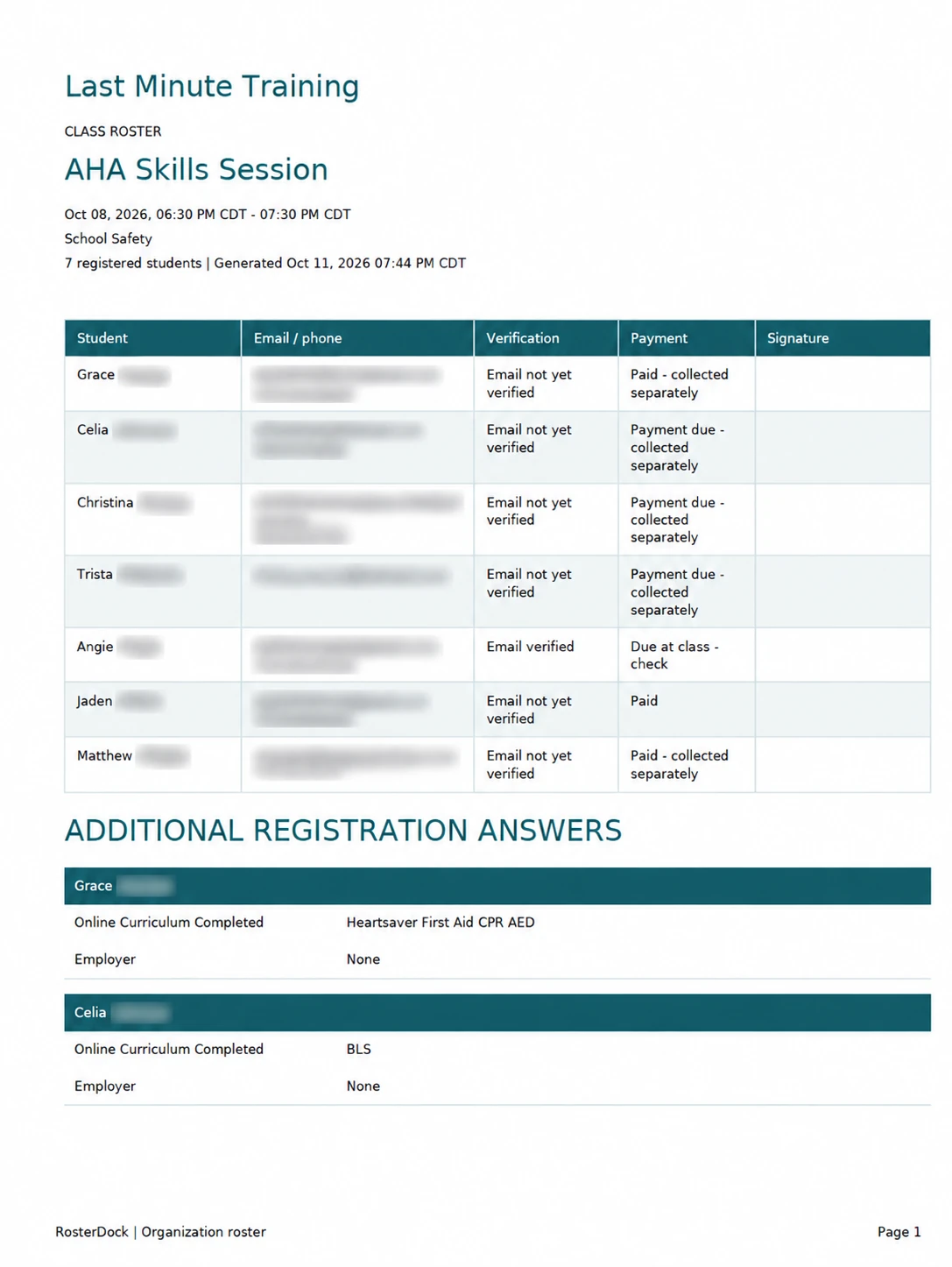
The PDF keeps the student list, payment status, signature space, and registration answers in one printable record.
Open a sample PDF roster · Download a sample CSV
The downloadable samples use fictional students. The pictured roster has identifying details hidden.
Both plans include class registration, attendance, PDF and CSV rosters, email reminders, teams, and Square online payments.
No monthly fee, no subscription card required, and no expiration.
Per organization. Everything in Free, plus:
Cancel Pro and keep using Free.
Square processing fees apply separately on both plans. Students pay the listed class price; platform fees come from your organization’s proceeds.
Use Square for class payments on either plan. Pro also lets you connect your website or internal tools through the API and webhooks.
Connect your Square account and accept online payments for paid classes. Track verified payments and refund updates in RosterDock. Prefer flexibility at the door? Enable cash or check at class and record payment when it arrives.
Online payments are available on both plans. Students pay the listed class price; your organization pays the platform fee and Square processing fees.
Connect your own website or internal tools to class and roster data. List and create events, retrieve rosters, and control access with organization-specific API keys that you can scope and revoke.
Send signed event notifications to your systems so connected tools can respond to registration activity. Delivery retries and integration activity views help you keep track of those connections.
PDFs include all registered students; CSVs include students marked present. Registration question answers appear in both formats.
Download a PDF flyer from a course template, with a QR code linking to its registration page.
Updated how class rosters load as registration lists grow.
Have a problem managing your classes, or a suggestion for RosterDock? Send it to Steven at Last Minute Training using the contact address below.
Reports, registration questions, and class flyers have changed as we use RosterDock and receive feedback. Tell us what would help with your own classes.
RosterDock is created by Steven Featherston at Last Minute Training. Use this address for setup questions, problems, and feature suggestions.
For questions about a specific class, payment, or reservation, contact the organizer listed on your class registration page.
RosterDock is class registration and student roster software for independent instructors, training businesses, schools, and organizations running educational events. It supports multiple locations, group reservations, and teams of administrators and instructors.
No. Students use your organization’s registration link to reserve seats and receive a secure email link to manage their reservation. Organizers and instructors use accounts to access their workspace.
Yes. Download PDF rosters for class use and CSV files for spreadsheets or other systems. You can also configure scheduled roster emails for administrators and assigned instructors.
Pro provides an API for listing and creating events and retrieving rosters, plus signed webhooks for event notifications. Square connects online class payments to your registration workflow on both Free and Pro.